


Charging Station Locator
2.84.00 Reviews
App Specs
- Version
- Varies with Device
- Updated On
- License
- Free
- Downloads
- 10,000+
- Developer
- POSITIVE INFINITY
- Categories
- Auto & Vehicles
- Platform
- Android
Screenshots
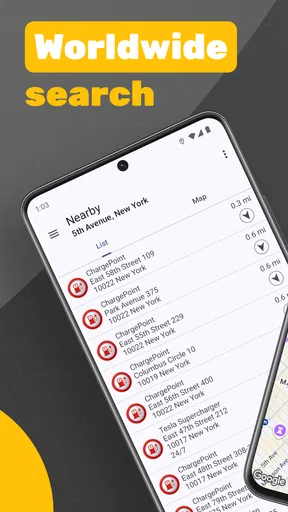
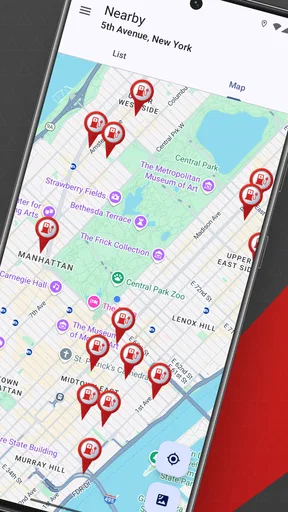
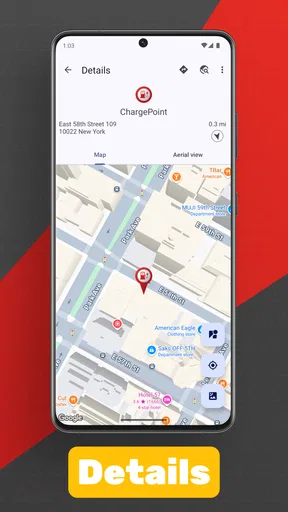
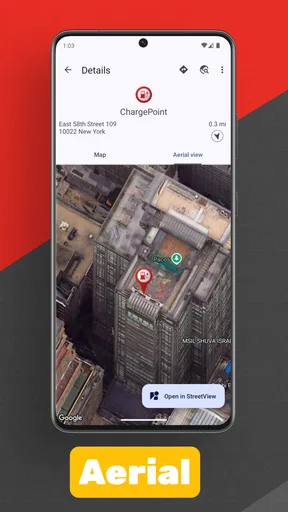
 Analysis by AppCompare
Finding a charging point sounds simple until the battery is low, the route is unfamiliar, and the first result turns out to be inconvenient. Charging Station Locator is an Android app from POSITIVE INFINITY that focuses on one clear job: helping me look for charging stations nearby or in another place. I found that narrow purpose useful when I treated it as a planning tool rather than as a complete driving companion.
The app is free to install and is aimed at everyone, which makes it easy to try without committing to a subscription. It belongs in the Auto & Vehicles category, and its straightforward approach will appeal to drivers who want a dedicated station search instead of a large navigation app filled with unrelated features. At the same time, the modest average rating of 2.8 from around fifty ratings suggests that the experience is not equally convincing for every user. My impression is similar: it can be handy, but it rewards a careful workflow.
How I use it before and during a journey
My baseline workflow starts before I leave. I open the app while I still have time to think, search around my current area, and then repeat the search for the destination or a planned stop. That second step matters. A station that is useful near home may be irrelevant once I am on a motorway or arriving in a different town, while a destination search gives me a chance to identify alternatives before the trip becomes urgent.
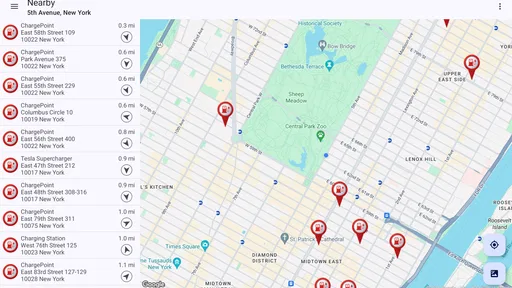
I prefer to compare several visible options instead of immediately choosing the closest marker. Distance is only one part of the decision. A slightly farther station may fit the route better, avoid a detour, or give me a backup nearby. The app’s value is strongest at this early stage, when I can use the map to think through possibilities rather than depend on a single result with a nearly empty battery.
For a realistic everyday example, imagine leaving work for a weekend visit in another city. I would check the area around my office first, then search the destination, and finally inspect a few places along the general route. I would note the most practical candidates and keep at least one alternative in mind. If the first location is busy, inaccessible, or unsuitable for my car, I am not starting the search from zero.
This is also where I would keep my expectations sensible. A station locator helps me find places; it does not automatically turn every result into a confirmed charging plan. I still need to judge whether the location is reachable, whether it suits my vehicle, and whether the surrounding route makes sense. That distinction is easy to overlook when a map presents several attractive-looking markers.
What the focused design gets right
The best thing about this app is its directness. I do not have to navigate through fuel prices, vehicle maintenance tools, traffic layers, or a broad collection of motoring services before reaching the core task. For a driver who simply wants to scan an area for charging stations, that reduced scope can feel calmer than opening a general-purpose navigation app.
Worth Reading Before You Choose

EA SPORTS FC Mobile 26 Is a Bigger Football Game, but It Takes Time

Flipboard Shows What News Apps Must Do Beyond the Feed

Switching to Android Auto Means Rethinking Your Driving Routine

Google Calendar Makes a Crowded Week Easier to Manage

Ludo King Makes the Most of the Minutes Between Plans

Baby Panda World Brings Quick Play to Modern Phones, but Its Game Library Feels Busy
It is particularly useful for occasional electric-vehicle drivers who do not want to build their whole routine around one charging network. Searching by place rather than thinking only about a familiar provider can widen the initial planning view. I also see value for renters, visitors, and people borrowing an electric car, because a dedicated locator is easier to understand than a collection of network-specific applications installed for a single trip.
There is a trade-off, though. A focused app may show where charging points are without providing all the operational context I would expect from a specialist network service. Before relying on a result, I would check the charger operator’s own information or another trusted source when the trip is important. That extra step is a weakness for spontaneous travel, but it is a sensible habit for long-distance planning.
Settings and preparation that make the search more useful
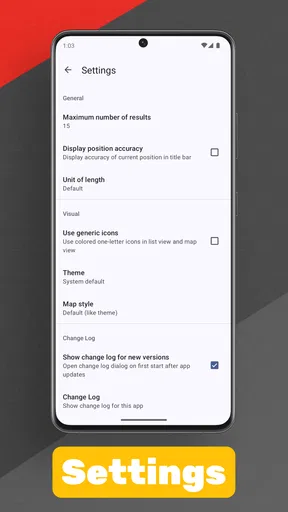
I would begin by checking the app’s basic behavior on my phone: location access, map display, and whether the current position is being used as the search starting point. I am not suggesting that the application offers a large settings system; rather, these are the practical controls that determine whether a locator feels convenient or frustrating. If the map opens in an unexpected area, I would search by destination manually instead of assuming the first view represents the whole journey.
Searching by a named place is one of the most useful habits. When I am planning ahead, I do not wait until I am physically near the destination. I search the town, neighborhood, or recognizable area and compare the results there. This turns the app from a last-minute rescue tool into a small planning aid. It also reduces the temptation to choose the first nearby point simply because the current location is convenient.
I would also keep the phone’s general navigation method available. Charging Station Locator can help identify a candidate, but a normal navigation app is usually better for turn-by-turn directions, traffic awareness, and the full route. The practical combination is simple: use this app to discover and compare charging locations, then use the navigation tool I already trust to reach the selected place.
Another preparation step is to search before entering a low-signal area or a complicated road system. I do not rely on any locator as my only source of information when I am already under pressure. Looking ahead gives me time to remember a backup and to decide whether a station requires a meaningful detour. This is a small change in routine, but it is more valuable than repeatedly refreshing the map at the worst possible moment.
The app is free, but it includes in-app purchases priced at $1.99 per item. That makes the initial trial low-risk, although I would still look carefully at any purchase prompt before confirming it. For a basic station search, I would first decide whether the free experience already covers my routine. Someone who only needs occasional destination checks may have a different view from a frequent driver who wants every available convenience.
Faster patterns for repeat users
After using a locator several times, I stop treating every search as a new event. I follow the same sequence: current area, destination area, route alternatives, then a backup. Repeating that order makes the process faster because I am not improvising while driving. The application itself does not need to do everything automatically for the habit to work; the efficiency comes from using its search purpose consistently.
For short local trips, I use a lighter version of the routine. I check the destination area first and then look at nearby options around my starting point only if the battery situation makes that necessary. For a longer journey, I reverse the emphasis and inspect possible stops before departure. This avoids spending equal time on every trip and keeps the app proportional to the decision I actually need to make.
A useful non-obvious trick is to think in areas rather than individual markers. If several stations appear around a destination, I compare their relationship to the places I plan to visit, not just their straight-line distance. A station near the edge of town may be less helpful than one slightly farther away but positioned along my return route. This kind of map reading is where the app becomes more useful than a simple “nearest point” search.
I also recommend separating discovery from confirmation. During discovery, I use the app broadly and allow several possibilities. During confirmation, I check the selected location through whatever reliable route or operator information is available to me. Mixing those two stages is a common source of frustration: a map result feels like a promise, when it is really a candidate for further checking.
Another repeatable habit is to avoid making the battery warning the trigger for the first search. I would rather spend a minute checking options while parked than attempt to interpret a map while moving. This is not a glamorous feature, but it is the difference between a useful planning routine and a stressful emergency search. The app supports that habit because its purpose is narrow enough to open quickly and understand immediately.
Where it falls short for advanced planning
The biggest limitation is that locating a station is not the same as managing a charging session. I would not choose this app alone if I needed a complete record of charging history, payment handling, live operational status, or a detailed vehicle-specific route plan. Those needs are better served by a network’s own application, a vehicle manufacturer’s system, or a mature navigation platform designed around electric-car travel.
I would also be cautious about treating every displayed location as equally suitable. A marker may be close but still awkward because of access, opening arrangements, parking rules, or compatibility concerns. The app can begin the search, but the driver remains responsible for checking the details that matter for the actual vehicle and journey. That is especially important when crossing unfamiliar regions or planning around a tight arrival time.
Its rating of 2.8 is worth considering before installation. With around ten thousand installs, it has reached a modest audience, but the public response is not especially strong. I would interpret that as a reason to test it on ordinary local trips first rather than making it the sole tool for a demanding holiday drive. A short trial reveals quickly whether its map behavior and search results suit my phone and my preferred way of planning.
The app also may not be the right choice for drivers who want one unified experience from search to navigation to payment. In that case, a vehicle-integrated system or a major charging-network application will probably feel more complete. Charging Station Locator makes more sense as a lightweight discovery layer, particularly when I want to look beyond one provider or check a place before I commit to a route.
I would not recommend depending on it while actively driving. The safer workflow is to search while parked, decide on a location, and then hand the route to a navigation tool. This is both more comfortable and more reliable than trying to make detailed comparisons from behind the wheel. The app’s simplicity helps with preparation, but it does not remove the need for safe driving habits.
Who should install it
I think it is a reasonable option for an electric-vehicle owner who wants a separate station finder, a traveler checking an unfamiliar destination, or a casual user who does not want to install several network apps immediately. It can also help someone planning a trip for a borrowed or rented electric car, because the first question is often simply, “Where can I look for charging?”
I would skip it if my priority is live charger availability, payment, session control, or deep integration with my car. I would also skip making it my only travel tool if I regularly drive long distances through unfamiliar areas. In those situations, the safer setup is a combination of a dependable navigation service, relevant operator applications, and this kind of broad locator only if it adds useful coverage.
The developer, POSITIVE INFINITY, has kept the product’s purpose easy to understand, and that clarity is its main advantage. Released in June 2021, it is not presented as a complete electric-mobility platform; I see it as a focused utility that can sit beside the tools I already use. The Everyone content rating makes it accessible to a broad audience, but accessibility should not be confused with complete trip assurance.
My verdict after building a repeatable routine
Charging Station Locator is most useful when I use it early, compare areas, and keep a backup in mind. Its simple station-search role makes it approachable, and the free entry point means I can test it without much commitment. I especially like the idea of using it to scan a destination before leaving, then switching to a full navigation app once I have chosen the charging area.
My recommendation is therefore conditional rather than enthusiastic. For local checks and basic trip preparation, it can earn a place on an electric-car driver’s phone. For high-stakes journeys, I would pair it with stronger sources and avoid assuming that finding a marker settles every practical question. The people most likely to appreciate it are those who want a quick, independent starting point and are comfortable doing the final checks themselves.
If that matches the way you travel, try it on a normal day first. Search near home, search a destination, compare the route-friendly options, and see whether the results fit your car and habits. If you want an all-in-one charging experience, choose a more comprehensive alternative instead. In my experience, this app works best not as the entire journey plan, but as the first, focused step in making one.
Pros
- Finds nearby EV charging stations using your current location.
- Useful filters help narrow results by connector type and availability.
- Station details can include pricing
- hours
- and charging speeds.
- Map view makes it easy to plan charging stops along a route.
- Helpful for comparing charging options before arriving at a station.
Cons
- Coverage and station details may vary significantly by country or region.
- Availability information can be delayed or inaccurate at busy locations.
- Some stations may require a separate operator app or account.
- Pricing data is not always available or consistently updated.
- Location access and mobile data are needed for the best experience.
FAQs for Charging Station Locator
What is Charging Station Locator and what does it do?
Charging Station Locator is an app designed to help electric vehicle drivers find nearby charging stations. After opening the app, you can explore available chargers on a map, check their locations, and identify stations that may be convenient for your route. It is especially useful when planning longer journeys or finding a charger in an unfamiliar area.
Can I use Charging Station Locator to plan an EV trip?
Yes, the app can be useful for basic electric vehicle trip planning by showing charging locations along or near your route. Before starting a journey, it is a good idea to review the available stations and consider their distance, opening hours, connector compatibility, and charging speed. However, drivers should always verify the information because station availability can change.
Does the app show whether a charging station is available?
Charging Station Locator may provide details such as a station’s location, connector information, operating status, or other useful charging data, depending on the area and the information supplied by its sources. Availability is not always guaranteed in real time, so a charger shown in the app could be occupied, temporarily unavailable, or out of service when you arrive.
Is Charging Station Locator free to download and use?
The app may be available to download at no cost, although certain features, services, advertisements, or premium options can vary depending on the version and platform. Users should check the Google Play Store or Apple App Store listing before downloading to confirm pricing, possible in-app purchases, and subscription details. Mobile data or location services may also be required.
Does Charging Station Locator support all electric vehicles and charger types?
The app can help you locate charging stations for many electric vehicles, but compatibility depends on the connectors and charging networks available in your region. Before visiting a station, check whether it supports your vehicle’s plug type, charging speed, and access requirements. Some stations may also require a separate operator app, account, payment method, or membership.


